If we remember Catalyst in chemistry, the Definition of it is a substance that makes a chemical reaction happen faster. Similarly, here Catalyst Optimizer is a Apache Spark component which makes transformation process faster and more optimized.
Now we can see the below diagram - let’s break through that
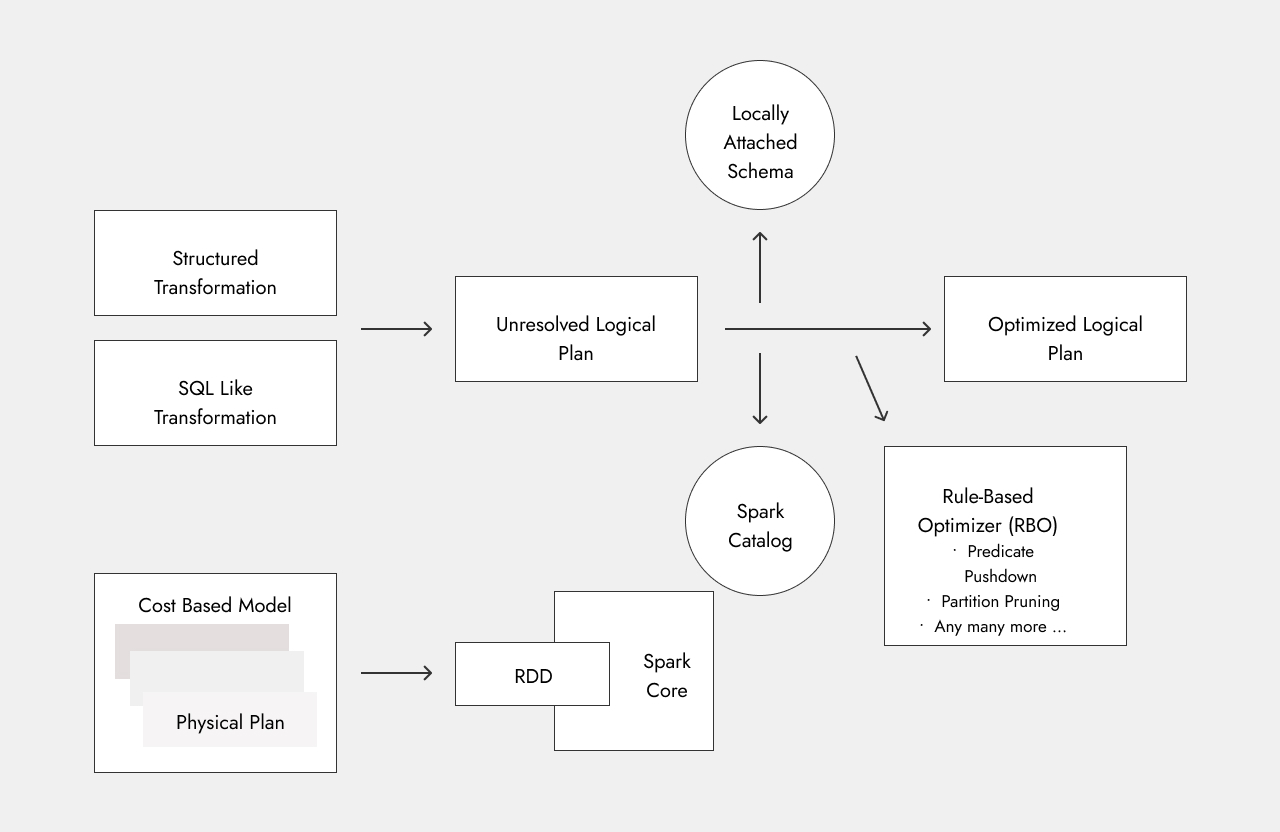
Structured Transformations & SQL-like Transformations
These are the transformation logic which we have written.
Unresolved Logical Plan
Let’s say our source data is csv file whose data is as given below
Name,City,Population,Age
Alice,Ahmedabad,500000,30
Bob,Surat,600000,25
Charlie,Ahmedabad,200000,35
David,Surat,300000,40
Eve,Baroda,150000,28
Now the Structured Transaformation we want to perform here is like below
df = spark.read.csv("people.csv", header=True, inferSchema=True)

df.groupBy("Country").sum("Salary").show()
Now if we see here The columns Country & Salary are not present at all in our source data. So this code will provide us with the below error if we execute it
pyspark.errors.exceptions.captured.AnalysisException: [UNRESOLVED_COLUMN.WITH_SUGGESTION] A column, variable, or function parameter with name `Salary` cannot be resolved. Did you mean one of the following? [`Name`, `City`, `Population`, `Age`]. SQLSTATE: 42703
So this is the first Stage - the Unresolved Logical Plan Our syntax and everthing is correct but column names which we entered are wrong so that’s why it didn’t proceed ahead
How Spark Checks This (DataFrame API)
For PySpark structured transformations, it uses the logically attached schema, which we can see using:
df.printSchema()
root
 |-- Name: string (nullable = true)
 |-- City: string (nullable = true)
 |-- Population: integer (nullable = true)
 |-- Age: integer (nullable = true)
How Spark Checks This (SQL)
In case of transformations written in literal SQL, the same error will occur. But this will be checked from the Spark catalog, as SQL transformations can only be performed if the dataframe is converted to a temp view
df.createOrReplaceTempView("people")
Now if we apply this command, we can see it’s present in the spark catalog
spark.catalog.listTables()
[Table(name='people', catalog=None, namespace=[], description=None, tableType='TEMPORARY', isTemporary=True)]
Resolved Logical Plan
Now we have gone through the unresolved logical plan. In the resolved logcial plan our transformation code will be correct, including the column names
df.groupBy("City").sum("Population").show()
+---------+---------------+
|     City|sum(Population)|
+---------+---------------+
|Ahmedabad|         700000|
|   Baroda|         150000|
|    Surat|         900000|
+---------+---------------+
Optimized Logical PLan
Now let’s say our transformation is like this - we don’t want to include the Population of Ahmedabad
df.groupBy("City").sum("Population").where(df.City != "Ahmedabad")
Now if we think here, if the WHERE condition is applied before aggregation, then it will be a more optimized approach, as there will be less shuffling.
Now if we run the below command, it will show all the plans which are there like Parsed Logical Plan, Analyzed Logical Plan, Optimized Logical Plan & Physical Plan
df.groupBy("City").sum("Population").where(df.City != "Ahmedabad").explain(extended = True)
== Parsed Logical Plan ==
'Filter '`!`('`=`(City#60, Ahmedabad))
+- Aggregate [City#60], [City#60, sum(Population#61) AS sum(Population)#126L]
   +- Relation [Name#59,City#60,Population#61,Age#62] csv

== Analyzed Logical Plan ==
City: string, sum(Population): bigint
Filter NOT (City#60 = Ahmedabad)
+- Aggregate [City#60], [City#60, sum(Population#61) AS sum(Population)#126L]
   +- Relation [Name#59,City#60,Population#61,Age#62] csv

== Optimized Logical Plan ==
Aggregate [City#60], [City#60, sum(Population#61) AS sum(Population)#126L]
+- Project [City#60, Population#61]
   +- Filter (isnotnull(City#60) AND NOT (City#60 = Ahmedabad))
      +- Relation [Name#59,City#60,Population#61,Age#62] csv

== Physical Plan ==
AdaptiveSparkPlan isFinalPlan=false
+- HashAggregate(keys=[City#60], functions=[sum(Population#61)], output=[City#60, sum(Population)#126L])
   +- Exchange hashpartitioning(City#60, 200), ENSURE_REQUIREMENTS, [plan_id=128]
      +- HashAggregate(keys=[City#60], functions=[partial_sum(Population#61)], output=[City#60, sum#128L])
         +- Filter (isnotnull(City#60) AND NOT (City#60 = Ahmedabad))
            +- FileScan csv [City#60,Population#61] Batched: false, DataFilters: [isnotnull(City#60), NOT (City#60 = Ahmedabad)], Format: CSV, Location: InMemoryFileIndex(1 paths)[file:/D:/Code/spark/people.csv], PartitionFilters: [], PushedFilters: [IsNotNull(City), Not(EqualTo(City,Ahmedabad))], ReadSchema: struct<City:string,Population:int>
Now if we observe the Optimized Logical Plan we can see that it is applying the filter first and then performing aggregation.
So it changed the execution order — this is done by RBO (Rule-Based Optimizer). Here it performed Predicate Pushdown, pushing the filter down to optimize the transformation.
There are various other RBO rules just like predicate pushdown. Spark uses them as needed and optimizes the transformations.
Final Execution
From the above example, we saw different plans. Spark analyzes all of these and picks the best optimized plan based on cost, then executes it.
After all this process, it is converted to RDD and then executed to perform the transformation.
Important Note
Catalyst Optimizer only comes into the picture if we are using DataFrames or Datasets and performing structured transformations or SQL-like queries.
It does not apply to RDD-based transformations, as RDDs do not have schema, so Catalyst is not able to perform its optimization process.